In Azure Active Directory a popular feature is leveraging groups in order to assign license to users. In many cases customers apply group based licenses to groups that are synchronized from Active Directory on premises. This allows administrators the flexibility maintain group membership in a centralized directory and the flexibility to assign licenses without a second operation in a different directory.
To establish group based licenses – a licensing policy is assigned to the group within Azure Active Directory. The following is an example:

I have recently had customer open cases for synchronization errors. These errors are viewable in the portal and may come in an email summary of directory synchronization errors that are detected. This is sample error from the azure portal.
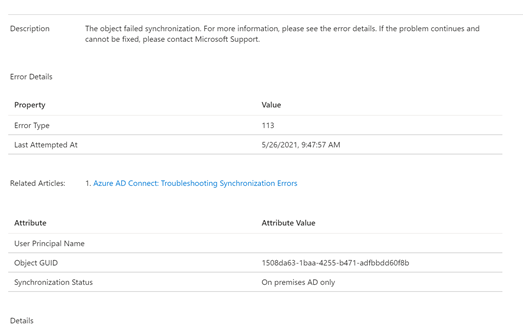
In this case the error is 113 and simply shows the object GUID of the object in the on premises directory.
When a sync error is listed in the Azure Portal and there is no additional information – a good place to look is the Azure Active Directory Connect server. In many cases the health agent on the server is sending up errors encountered in the sync or export process. In this particular example when reviewing the export to Azure Active Directory the same error is noted.


When selecting group from the export errors section the administrator has access to the export errors tab.
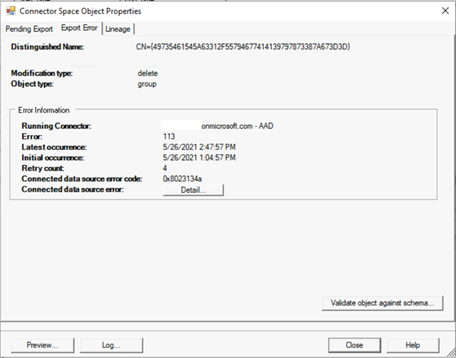
The first thing that is noticed is that the operation that is generating the error is a Delete operation. We already know that it is a group based on the previous information from Azure Active Directory and the sync error. Click on the details tab we discover the full information regarding the failure.
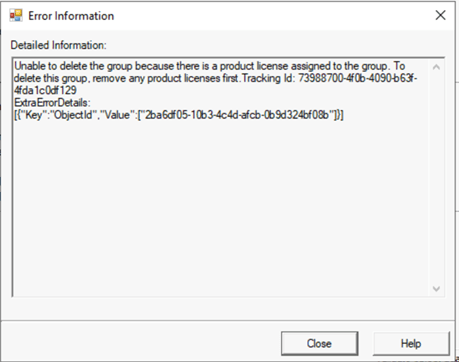
Unable to delete the group because there is a product license assigned to the group. To delete this group, remove any product licenses first.
Tracking Id: 73988700-4f0b-4090-b63f-4fda1c0df129
ExtraErrorDetails:
[{“Key”:”ObjectId”,”Value”:[“2ba6df05-10b3-4c4d-afcb-0b9d324bf08b”]}]
The error text pinpoints the exact issue – a deletion is being attempted on a group that has group based licenses applied. The delete operation is blocked and an error is logged. This makes sense – imagine what problem could occur if we allowed a group to be deleted that had license applied – and resulted in those licenses being removed.
To correct this condition the administrator must remove the licenses from the group. Once the licenses are removed from the group the next sync cycle will successfully delete the group. The error 113 will clear after the next health submission update.
 TIMMCMIC
How do I remove the licence from the group as the group no longer appears in Azure AD?
LikeLike
Alan – the group itself should be able to be located in azure ad and should have licenses. If the group does not have licenses on it I would recommend you raise a case. Also keep in mind if you removed the licenses from the group it still has to reprocess the removal – which means that you cannot delete it immediately. Sometimes this is an issue of timing…
LikeLike
How do I find out which group the error code means?
LikeLike
I believe if you click on the error during export it shows you the information regarding the name of the group being deleted.
LikeLike
The only thing I see on the AAD-Connector is this https://prnt.sc/scrQn6Vws7UL
LikeLike
Go to connectors – right click on the azure ad connector and search connector space. You should be able to place that CN value in the search box and it will tell you the group.
LikeLike