It is a common implementation for customers to control the resources that employees can access. To that end, Office 365 publishes the IP addresses and URLs that are necessary for a successful Office 365 deployment. In addition to publishing the list, a JSON file is made available for services that can automatically digest this information for automatic rules creation. Rules are generally split into two categories: (1) endpoints accessible via an IP address and (2) endpoints accessible via a URL. There was occasionally some overlap where certain URL-based endpoints had IP address ranges published. For URL-based endpoints, the ports required for access are also published and it is expected that any IP address for that URL is accessible. The documentation on this is at Office 365 URLs and IP address ranges – Microsoft 365 Enterprise | Microsoft Docs.
Recently I worked a customer escalation where the customer was being denied access to http://www.office.com. When reviewing the documentation http://www.office.com was published to use an IP address space of 52.108.0.0/14.
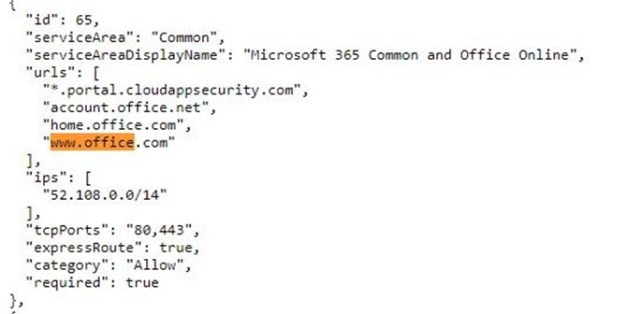
We observed that http://www.office.com would routinely be redirected to IP addresses in the 13.X.X.X subnets, and when reviewing the documentation, we noticed the following:
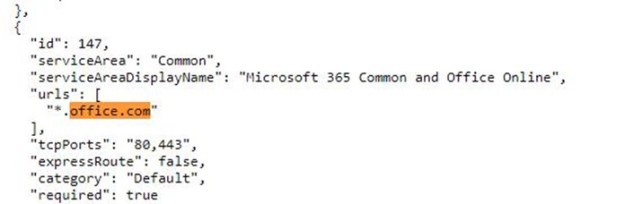
In this case, there is an explicit IP range published and then an open URL-based exception. For this customer, the more specific scenario was applied, resulting in users being unable to access http://www.office.com. In consultation with our engineering group, we determined that URL-based IP publishing is being phased out in favor of simple URL publishing. Therefore, in this instance, the new scheme is expected and any access to anything *.office.com should be allowed to any endpoint. The ultimate resolution was to remove the URL and IP address combination associated with http://www.office.com.
If you are ingesting the JSON file, you may want to start ensuring your environment is ready. The network devices that you use will require interpretation of URL-based filtering and will not be able to rely solely on IP / URL-based filtering to ensure a successful Office 365 deployment.
 TIMMCMIC