In Azure Active Directory the default country for user objects that are provisioned from on-premises is the region where the tenant was created. For many companies that are multi-national they expect the region in Azure Active Directory to reflect the region that the user resides in.
Account attributes are determined by the attribute set replicated through Azure Active Directory Connect. The country attribute is no exception – in order for a directory synchronized object to reflect the correct country it must be accurately set in the on-premises Active Directory.
In Active Directory Users and Computers, on the address tab, the administrator may specify the country of the user.
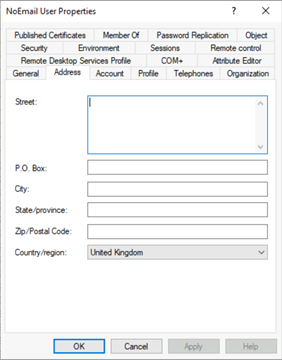
The result of completing this operation is setting three attributes in Active Directory. These attributes are C, CO, and Country Code.
PS C:\> Get-ADUser NoEmailUser -Properties “c”,”co”,”countrycode”
c : GB
co : United Kingdom
countrycode : 826
DistinguishedName : CN=NoEmail User,OU=User,OU=DLMembers,OU=DLConversion,DC=home,DC=domain,DC=com
Enabled : True
GivenName : NoEmail
Name : NoEmail User
ObjectClass : user
ObjectGUID : 4ab27bae-d02c-48cd-88eb-4ba6fd430ce6
SamAccountName : NoEmailUser
SID : S-1-5-21-278042269-1514808692-1118015945-42988
Surname : User
UserPrincipalName : NoEmailUser@e-domain.com
Many organizations do not utilize native tools to provision users in AD. In these environments users are provisioned through connections to human resource systems or other third party directories. In many instances these third party systems flow the country into the attribute C.
PS C:\> Get-ADUser NoEmailUser1 -Properties “c”,”co”,”countrycode”
c : GB
countrycode : 0
DistinguishedName : CN=NoEmailUser1,OU=User,OU=DLMembers,OU=DLConversion,DC=home,DC=domain,DC=com
Enabled : True
GivenName :
Name : NoEmailUser1
ObjectClass : user
ObjectGUID : 1ce0caf2-1982-45d3-9db7-a49878953d22
SamAccountName : NoEmailUser1
SID : S-1-5-21-278042269-1514808692-1118015945-43637
Surname :
UserPrincipalName : NoEmailUser1@domain.com
When reviewing the user in AD Users and Computers the country does appear to be set.
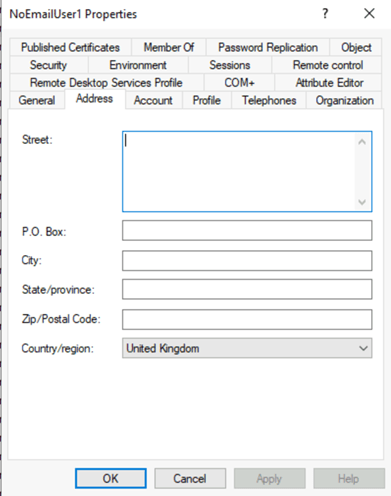
This can lead to some confusion – for the country to be complete set the C, CN, and Country Code should be set.
Many customers who utilize third party provisioning systems will discover that the country code does not reflect in Azure AD whereas when adjusting the country code via ADUC or resetting it on a provisioned account in ADUC it successfully reflects.
Azure AD Connect is responsible for evaluating the attribute set on premises and replicating the changes to Azure Active Directory. The attributes replicated are based on a set of rules. The population of county occurs through the rule “In from AD – User Common”.

In the “In from AD – User Common” rule the attributes C and CO are imported into the metaverse.


Once in the metaverse – the attributes need to be mapped as to what is exported to Azure AD. In this case country is exported through “Out to AAD – User ExchangeOnline”. The metaverse attribute CO is mapped to the country field in Azure AD.

This demonstrates the issues associated with third party directories and only setting the C values. If the CO value is not also set – even though the C value is set (and the GUI shows a country) there will be no country replicated to Azure AD.
To fully provision the country for a user the C, CO, and CountryCode values should be set. Standards for the country codes utilized and background information maybe found here.
 TIMMCMIC