Microsoft publishes network guidance monthly for all Microsoft 365 URLs and IP addresses that are optional or required for Microsoft 365 service adoption.
As the service has grown so has the number of IP ranges and the scops of the subnets they contain. When reviewing the documentation is may not always be intuitive or easily discovered if the IP address that you are referencing is located in a Microsoft 365 data center.
I have published a script to the Powershell gallery -> Office365IPAddress.ps1. This script will download all published IP spaces for M365 services from our web services and parse all subjects and services associated with them. If the IP address provided is found within one of our published IP spaces the service information is returned. The script works across all M365 hosted services including China, GCC High, and Department of Defense.
To utilize the script run Powershell 5.1 from your workstation or server. Run install-Script Office365IPAddress.
PS C:\> Install-Script Office365IPAddressThe script installs in Powershell 5.1 but requires Powershell 7.x in order to run. Install or update Powershell 7.x from here. Once installed open a Powershell 7.x window. If you attempt to run the script from an unsupported version of Powershell an error is returned.
[8/18/2024 3:22:54 PM] - Powershell 7 and higher is required to run this script.
[8/18/2024 3:22:54 PM] - Please run module from Powershell 7.x
The script accepts three parameters:
- IPAddressToTest: This is the IP address to search the web services for.
- LogDirectory: A directory where log files from the command may be stored.
- AllowQueryIPLocationInformationFromThirdParty: Boolean value that specifies if a third party geo-location api may be queried to return the public location associated with the IPAddressToTest.
The following command tests the IP address 52.109.45.45:
PS C:\> Office365IPAddress.ps1 -IPAddressToTest "52.109.45.43" -logFolderPath "c:\temp" -allowQueryIPLocationInformationFromThirdParty:$TRUEIf the IP address to test is found within any of our web services published files the results are returned to the window. The information provided includes:
- ID: The ID of the service description contained in the web services json file.
- M365Instance: The M365 service instance json file the IP address was located in.
- ServiceAreaDisplayName: The service area the IP address / subnet are associated with.
- IPInSubnet: Which subnet in the service description contains the IPAddressToTest.
In the following example the IP address is associated with the Microsoft 365 Command Offline Online service description for our Microsoft 365 WorldWide (+GCC) service instance.
[8/18/2024 3:26:58 PM] - *
[8/18/2024 3:26:58 PM] - **
[8/18/2024 3:26:58 PM] - ******************************************************
[8/18/2024 3:26:58 PM] - The IP Address: 52.109.45.43 was located in the following Office 365 Services:
[8/18/2024 3:26:58 PM] - The IP Address geo-location is: KR

ID                     : 46
M365Instance           : Microsoft 365 Worldwide (+GCC)
TCPPorts               : 80,443
Required               : True
URLs                   : {*.officeapps.live.com, *.online.office.com, office.live.com}
IPs                    : {13.107.6.171/32, 13.107.18.15/32, 13.107.140.6/32, 52.108.0.0/14…}
ExpressRoute           : True
ServiceAreaDisplayName : Microsoft 365 Common and Office Online
IPInSubnet             : 52.108.0.0/14

ID                     : 64
M365Instance           : Microsoft 365 Worldwide (+GCC)
TCPPorts               : 443
Required               : True
URLs                   : {*.compliance.microsoft.com, *.protection.office.com, *.security.microsoft.com,
                         compliance.microsoft.com…}
IPs                    : {13.107.6.192/32, 13.107.9.192/32, 52.108.0.0/14, 2620:1ec:4::192/128…}
ExpressRoute           : True
ServiceAreaDisplayName : Microsoft 365 Common and Office Online
IPInSubnet             : 52.108.0.0/14

[8/18/2024 3:26:58 PM] - A XML file containing the above entries is available in the log directory.
[8/18/2024 3:26:58 PM] - ******************************************************
[8/18/2024 3:26:58 PM] - **
[8/18/2024 3:26:58 PM] - *
In the following example the IP address specified does not exist in any M365 service instance.
PS C:\> Office365IPAddress.ps1 -IPAddressToTest "59.3.2.1" -logFolderPath "c:\temp" -allowQueryIPLocationInformationFromThirdParty:$TRUE[8/18/2024 3:31:27 PM] - ******************************************************
[8/18/2024 3:31:27 PM] - The IP Address: 59.3.2.1 was located in any Office 365 Services.
[8/18/2024 3:31:27 PM] - ******************************************************In addition to the active endpoint information the web service also publishes change information. The change information dates back to 2018. If the IP address is found in an M365 service, the change information is queried to display any additions that contained the IP address.
IPInSubnet             : 52.108.0.0/14
Version                : 2019012800
Disposition            : Change
IPsAdded               : {52.108.0.0/14}
M365Instance           : Microsoft 365 Worldwide (+GCC)
ServiceAreaDisplayName :
ChangeID               : 307
EndpointSetID          : 65

IPInSubnet             : 52.108.0.0/14
Version                : 2019012800
Disposition            : Change
IPsAdded               : {52.108.0.0/14}
M365Instance           : Microsoft 365 Worldwide (+GCC)
ServiceAreaDisplayName : Microsoft 365 Common and Office Online
ChangeID               : 309
EndpointSetID          : 64
If the IP address is not found in any M365 service, the change files are searched for any remove operations.
IPInSubnet             : 23.103.144.0/20
Version                : 2018072800
Disposition            : Change
M365Instance           : Microsoft 365 Worldwide (+GCC)
ServiceAreaDisplayName : Exchange Online
ChangeID               : 3
EndpointSetID          : 9
IPsRemove              : {23.103.144.0/20, 23.103.212.0/22, 40.107.128.0/18}

IPInSubnet             : 23.103.144.0/20
Version                : 2018072800
Disposition            : Change
M365Instance           : Microsoft 365 Worldwide (+GCC)
ServiceAreaDisplayName : Exchange Online
ChangeID               : 5
EndpointSetID          : 10
IPsRemove              : {23.103.144.0/20, 23.103.212.0/22, 40.107.128.0/18}

IPInSubnet             : 23.103.144.0/20
Version                : 2019022800
Disposition            : Change
M365Instance           : Microsoft 365 Worldwide (+GCC)
ServiceAreaDisplayName : Exchange Online
ChangeID               : 327
EndpointSetID          : 9
IPsRemove              : {23.103.132.0/22, 23.103.136.0/21, 23.103.144.0/20, 23.103.198.0/23…}

IPInSubnet             : 23.103.144.0/20
Version                : 2019022800
Disposition            : Change
M365Instance           : Microsoft 365 Worldwide (+GCC)
ServiceAreaDisplayName : Exchange Online
ChangeID               : 334
EndpointSetID          : 10
IPsRemove              : {23.103.132.0/22, 23.103.136.0/21, 23.103.144.0/20, 23.103.198.0/23…}
When the script has completed and html file containing the information found is displayed. The report includes four sections
- IP or URL Entries in Office 365
- These are the active URL and IP entries currently utilized by Office 365.
- IP or URL Change Entries in Office 365
- These are the changes for modifications or additions since 2018
- No IP or URL Entries in Office 365
- These are the URLs and IPs that were removed from Office 365.
- If the URL requested cannot be located the removals are searched.
- No IP Entries in Azure Services
- These are IP addresses found using the optional feature to search Azure Services.
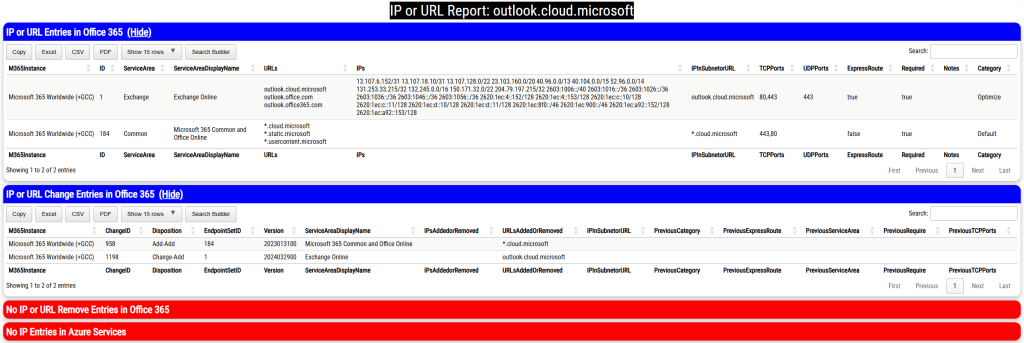
The log file directory contains XML exports of all files tested and all results. The HTML file displaying the results is also stored within the same directory.
This script should allow you to efficiently identify if a specified IP address belongs to a Microsoft 365 service instance.
 TIMMCMIC